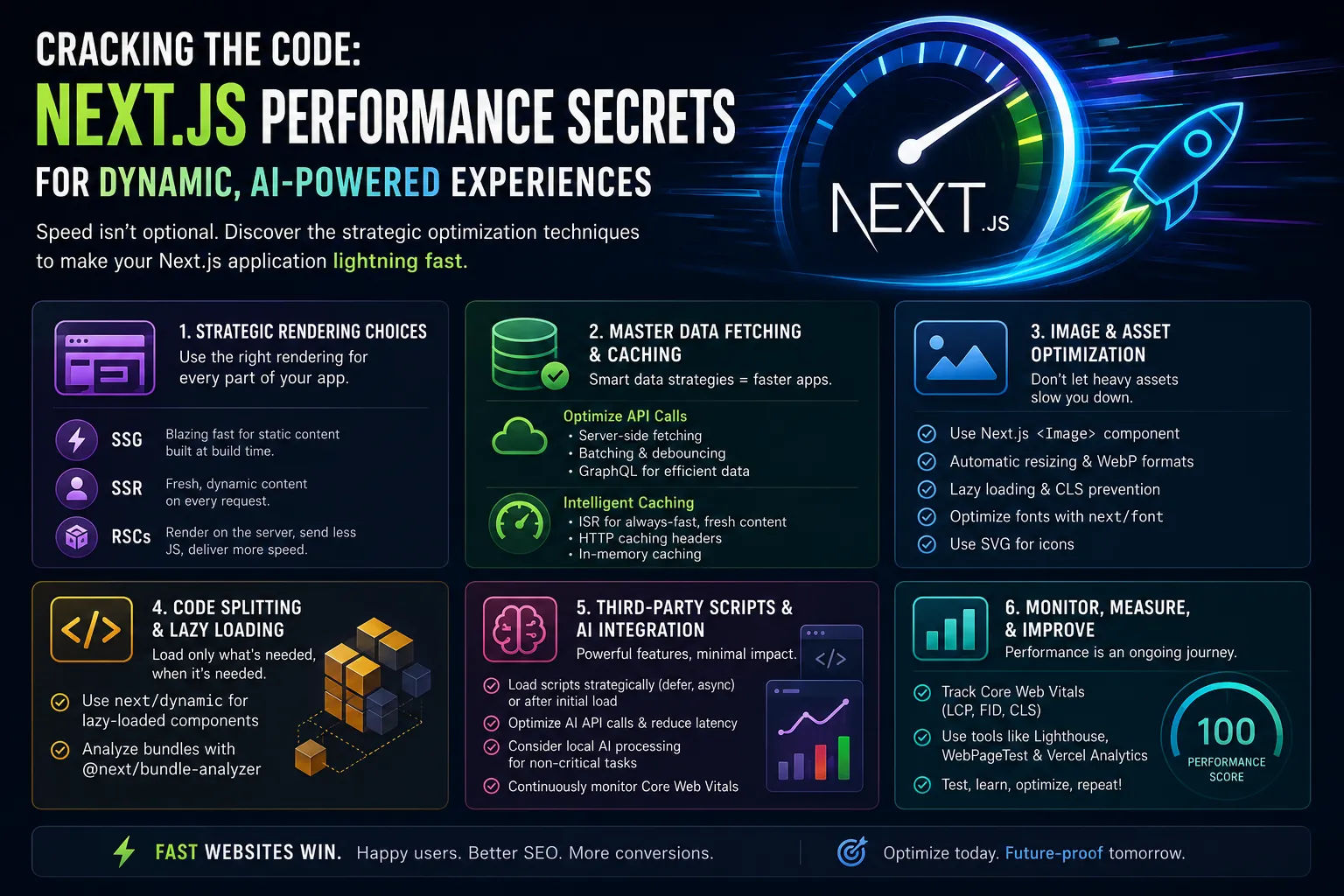
Cracking the Code: Next.js Performance Secrets for Dynamic, AI-Powered Experiences
In the rapidly evolving landscape of web development, user expectations for speed, responsiveness, and dynamic content have never been higher. For Next.js applications, especially those integrating AI-driven features or serving highly personalized experiences, performance isn't just a nice-to-have – it's a critical differentiator. As a sharp editor, I've seen countless sites struggle with sluggishness despite robust features. The truth is, building a feature-rich Next.js app that also feels instantaneous requires a deliberate, strategic approach to optimization.
This isn't about chasing every micro-optimization, but rather understanding the core principles that dictate your application's speed and how to apply them effectively. Let's dive into the practical strategies that will help your Next.js site not just perform, but truly fly.
Beyond the Basics: Strategic Rendering Choices
Next.js offers a powerful spectrum of rendering options, and choosing the right one for each part of your application is foundational to performance. While Static Site Generation (SSG) delivers unparalleled speed for static content, dynamic features and AI integrations often demand Server-Side Rendering (SSR) or the nuanced power of React Server Components (RSCs).
- Static Site Generation (SSG): Ideal for content that doesn't change frequently. Pages are built at build time and served as static HTML files, offering incredible speed and resilience. Think blog posts (like this one!) or product landing pages.
- Server-Side Rendering (SSR): Perfect for highly dynamic, user-specific content that needs to be fresh on every request. While it adds a slight overhead compared to SSG, SSR ensures users always see the most up-to-date information without client-side data fetching delays.
- React Server Components (RSCs): This is where modern Next.js truly shines for dynamic applications. RSCs allow you to render components directly on the server, fetching data and even interacting with databases before sending minimal HTML and JavaScript to the client. This significantly reduces client-side bundle sizes and improves initial page load times, especially for complex UIs that need to fetch a lot of data. For a deeper dive into how RSCs transform dynamic experiences, check out our post on Beyond Static: Next.js Server Components and AI for Dynamic Experiences.
The key is to use a hybrid approach. Don't SSR everything just because you have some dynamic elements. Identify which parts of your page truly need real-time data or AI processing, and apply the most efficient rendering strategy accordingly.
Mastering Data Fetching and Caching
Inefficient data fetching is a silent killer of performance. When your Next.js application relies on external APIs or databases, how and when you retrieve that data is paramount.

Optimizing API Calls
- Server-Side Data Fetching: Whenever possible, fetch data on the server using
getServerSideProps,getStaticProps, or within Server Components. This avoids client-side waterfalls and ensures the page is delivered fully hydrated. - Batching and Debouncing: For client-side interactions that trigger multiple data requests, consider batching them into a single request or debouncing input fields to reduce unnecessary API calls.
- GraphQL vs. REST: GraphQL can be particularly powerful for AI-driven applications that require specific, nested data structures, allowing clients to request exactly what they need and nothing more, thus reducing over-fetching.
Intelligent Caching Strategies
Caching is your best friend for speed. Next.js, especially with Vercel, offers robust caching mechanisms out of the box.
- ISR (Incremental Static Regeneration): For content that needs to be fresh but doesn't change on every single request, ISR allows you to rebuild static pages in the background, serving cached versions while new ones are generated. This is a game-changer for frequently updated content like featured posts or product listings. You can see this in action when building components like a dynamic featured posts section, as discussed in Building a Dynamic Featured Posts Component in Next.js 15 with Prisma.
- HTTP Caching Headers: Leverage
Cache-Controlheaders for both API responses and static assets to instruct browsers and CDNs on how long to store content. - In-Memory Caching: For frequently accessed data on the server, consider an in-memory cache to avoid repeated database queries or API calls.
Image and Asset Optimization: Don't Overlook the Visuals
Large, unoptimized images are one of the most common performance bottlenecks. Next.js provides the <Image> component specifically to combat this.
- The Next.js
<Image>Component: Always use it. It automatically optimizes images by:- Resizing images for different screen sizes.
- Serving images in modern formats like WebP.
- Lazy loading images that are off-screen.
- Preventing cumulative layout shift (CLS) by reserving space.
- Font Optimization: Self-host critical fonts or use
next/fontto ensure fonts are loaded efficiently and don't block rendering. - SVG for Icons: Use SVG for vector graphics and icons; they are resolution-independent and typically have small file sizes.
Code Splitting and Lazy Loading
Even with optimal rendering and data fetching, your JavaScript bundle can become bloated. Next.js automatically code-splits pages, but you can go further.
- Dynamic Imports: Use
next/dynamicfor lazy loading components that aren't critical for the initial page load. This is especially useful for complex UI elements, modals, or components that only appear after user interaction. - Analyze Your Bundle: Tools like
@next/bundle-analyzerhelp you visualize your JavaScript bundle and identify large dependencies that might be candidates for lazy loading.
Third-Party Scripts and AI Integration Impact
Integrating third-party analytics, chat widgets, or even complex AI models can introduce significant performance overhead.
- Strategic Script Placement: Load non-essential scripts with the
deferorasyncattributes, or dynamically inject them after the initial page load. - Local AI Processing vs. Cloud APIs: If your AI features rely on external APIs (e.g., for hyper-personalization, as discussed in AI for Hyper-Personalization: Revolutionizing Small Business Marketing), optimize those calls. If feasible, consider running smaller, client-side AI models for less critical tasks to reduce network latency.
- Performance Monitoring: Regularly monitor the impact of third-party scripts and AI integrations on your Core Web Vitals.
Conclusion: Performance is an Ongoing Journey
Optimizing a Next.js application, particularly one that leverages dynamic content and AI, isn't a one-time task. It's an ongoing commitment to refining your architecture, code, and deployment strategies. By making informed choices about rendering, data fetching, asset management, and code delivery, you can ensure your Next.js application delivers a lightning-fast, engaging, and future-proof experience for your users. Start with the biggest wins, monitor your progress, and keep iterating. Your users—and your business—will thank you for it.






