The Ultimate Guide to Safe Image Compression Privacy First Optimization
Listen to Article
High-quality browser TTS. No downloads.
Speed
The Ultimate Guide to Safe Image Compression: Why WisemixMedia is the Best Online Tool in 2026
In today’s fast-paced digital landscape, speed and privacy are the two most valuable currencies. Whether you are a professional web developer, a creative graphic designer, or a social media enthusiast, you know that high-quality images are essential. However, large image files can cripple your website’s performance and devour user bandwidth.
The solution? WisemixMedia Image Compressor. But this isn't just another online utility. It is a revolutionary, privacy-centric tool designed to provide elite-level optimization without ever compromising your personal data.
1. What is Image Compression and Why Do You Need It?
Image compression is the process of reducing the file size of a digital image while maintaining its visual integrity. Every digital photo contains thousands of bits of data; much of this data is "redundant" and cannot be perceived by the human eye.
Why is this crucial in 2026?
Web Performance: Websites that load in under 2 seconds have higher conversion rates. Large images are the #1 cause of slow page speeds.
SEO Ranking: Google’s Core Web Vitals explicitly penalize sites with high LCP (Largest Contentful Paint) scores caused by heavy images.
Storage Costs: For developers, optimized images mean lower hosting and CDN costs.
User Experience: Mobile users on limited data plans appreciate fast-loading, lightweight pages.
2. Privacy: No Compromise (The Browser-Side Revolution)
The biggest fear with online tools is data leakage. Most compressors require you to upload your images to their remote servers. This means a copy of your personal or sensitive business photos exists on a computer you don't control.
WisemixMedia changes the game. Our tool operates using Client-Side JavaScript Technology. * Zero Uploads: Your images never leave your device. They stay in your browser.
Local Processing: The compression happens on your computer’s hardware, not our server.
Total Security: Since there is no transmission of data, there is no risk of interception.
Offline Functionality: Once the page is loaded, you can even turn off your internet and continue compressing images.
3. High-Performance Algorithms: 90% Reduction, 100% Quality
Our tool uses advanced mathematical algorithms to ensure your images look crisp even after significant size reduction.
Supported Formats:
JPEG/JPG: Perfect for photographs. We remove unnecessary EXIF metadata and optimize the Huffman coding.
PNG: Ideal for logos. We use specialized quantization to reduce colors without losing transparency.
WebP: The modern standard. We help you convert and compress to Google’s favorite format for maximum SEO boost.
GIF: Reduce the weight of heavy animations by up to 80%.
SVG & TIFF: Professional support for vector and high-fidelity archival files.
4. How to Use WisemixMedia Image Compressor
We believe in simplicity. You don't need to be a tech expert to use our professional-grade tool.
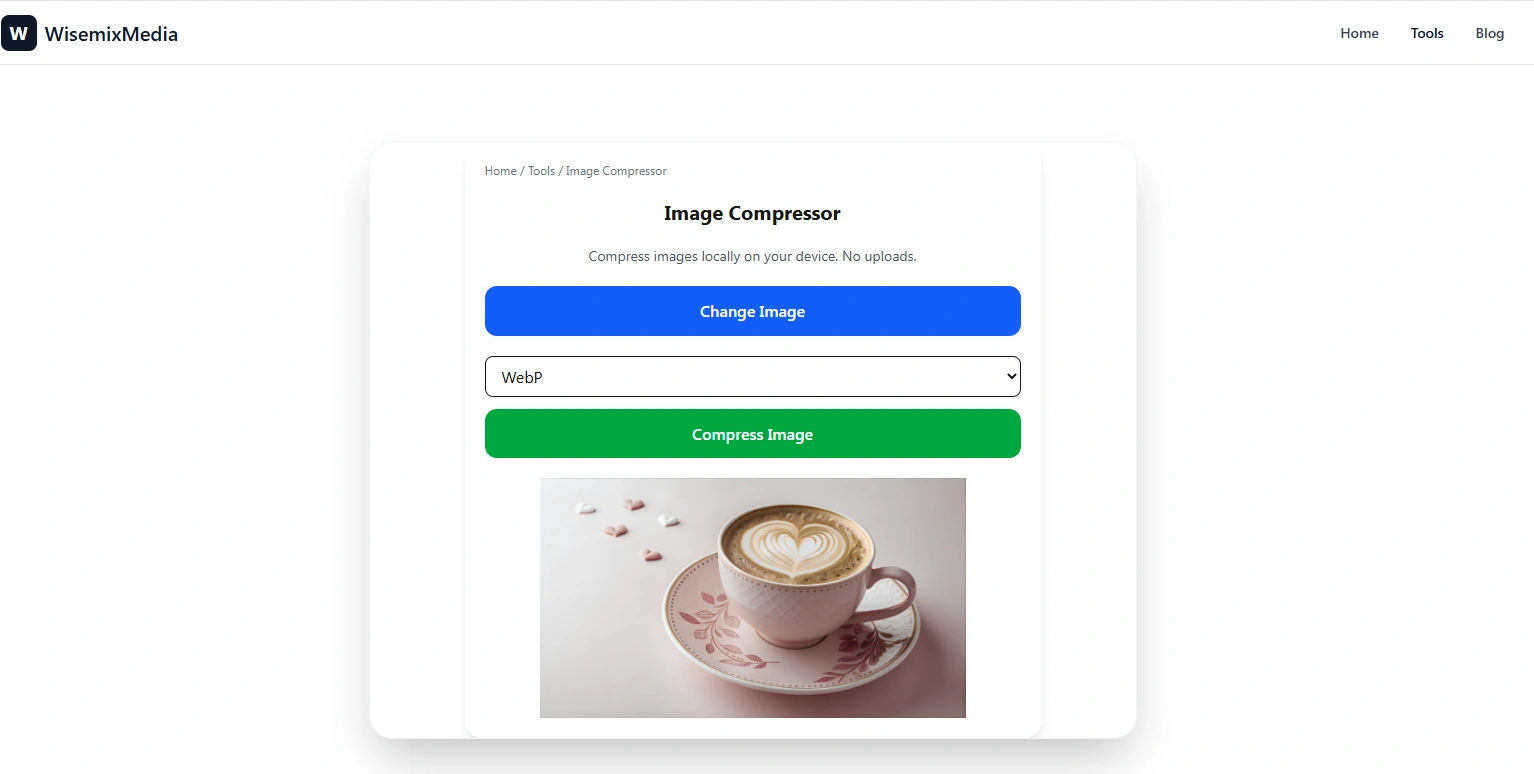
Drag & Drop: Simply drag your files into the optimization zone or click "Choose Image."
Instant Execution: Because the processing is local, there is no "uploading" wait time. Compression is near-instant.
Analyze & Compare: Our real-time preview shows you the original size vs. the new size and the percentage of space saved.
One-Click Download: Save your optimized images directly to your hard drive.
5. Technical Insights: Lossy vs. Lossless Compression
Understanding the difference helps you choose the right setting for your project:
Lossless Compression
This method reduces file size by removing metadata and finding more efficient ways to store pixel data without losing a single bit of information. It is best for technical drawings or medical images where every pixel is vital.
Lossy Compression
This is the "magic" behind our 90% reduction capability. It intelligently discards data that is invisible to the human eye. For web use, Lossy is the winner, as it provides the smallest files with virtually no visible difference in quality.
6. The Impact on SEO and Core Web Vitals
Google uses a set of metrics called Core Web Vitals to measure user experience. Images directly affect:
LCP (Largest Contentful Paint): How fast the main content loads.
CLS (Cumulative Layout Shift): Optimized images with defined dimensions prevent pages from "jumping" during load.
By using WisemixMedia, you ensure that your "Image SEO" is perfect, helping you climb to the first page of search results.
7. WisemixMedia vs. The Competition
FeatureStandard Online ToolsWisemixMediaData PrivacyImages stored on servers100% Private (Local)SpeedSlow (Upload/Download)Instant (No Upload)CostOften has limits or ads100% Free & UnlimitedBatch SupportLimitedFull Browser BatchingQuality ControlFixedAdvanced Customization
8. From the Farm to the Cloud: The Maqbool Story
WisemixMedia wasn't built in a fancy office in Silicon Valley. It was built with sweat and determination. I am Maqbool, a laborer working 10-hour shifts on a farm in Saudi Arabia. I spent my nights learning Next.js and Prisma to create a tool that respects people’s privacy.
This tool is my contribution to the global community—a free, fast, and safe way for everyone to optimize their digital lives. When you use WisemixMedia, you are supporting independent, ethical development.
9. Best Practices for Image Optimization in 2026
Choose the Right Format: Use WebP for the web, PNG for transparency, and JPEG for complex photos.
Define Dimensions: Always resize your image to the actual size it will appear on the screen before compressing.
Leverage 600 DPI for Print: If you plan to print, use our DPI Converter after compressing to ensure high-resolution output.
Lazy Loading: Use the compressed images with
loading="lazy"in your HTML code for maximum speed.
10. Frequently Asked Questions (FAQ)
Q: Is there a limit on how many images I can compress?
A: No. Since we use your browser's power, there are no server-side limits. You can compress hundreds of images for free.
Q: Does compressing an image reduce its physical size (width/height)?
A: No, it only reduces the file size (bytes). If you want to change dimensions, use our Image Resizer tool.
Q: Can I use this tool on my mobile phone?
A: Yes! Our responsive design works perfectly on Android and iOS browsers.
11. Conclusion: The Future is Fast and Private
The era of blindly uploading data to unknown servers is over. WisemixMedia Image Compressor offers you the professional results of high-end software with the convenience of a web app and the security of an offline tool.
Optimize your images today. Protect your privacy. Speed up the web.
Next Steps for you, Maqbool Bhai:
Internal Linking: In this blog, make sure the text "Image Resizer" and "DPI Converter" are clickable links to those specific tools.
Alt Text: When you upload images to this blog, use Alt tags like:
Secure Image Compression Tool 2026andPrivacy-First JPG Compressor.Share: Post the link to this blog on your LinkedIn and YouTube (using your vlog link) to get those initial visitors!